
eFootball™ CHAMPION SQUADS
KONAMISports
4.31.39K Reviews
- Version
- 9.8.0
- Installs
- 10.00M
- Age Rating
- Everyone
Screenshots

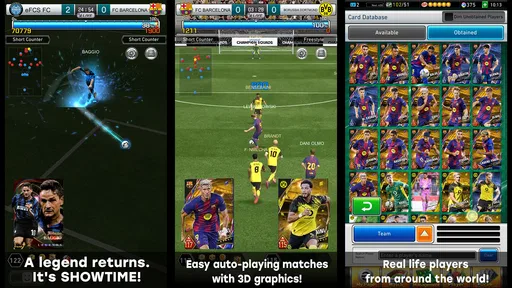
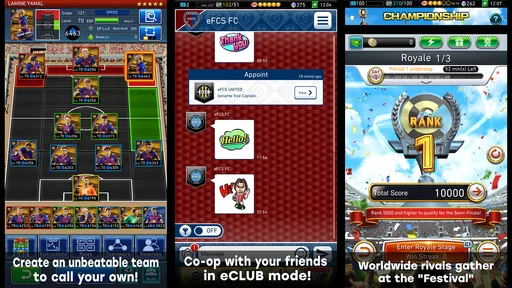

Our Review of eFootball™ CHAMPION SQUADS
 Analysis by Appyee
When a phone or tablet gets passed around at home, a football game needs to be easy to dip into without turning every spare moment into a long session. I see eFootball™ CHAMPION SQUADS as a game for people who enjoy shaping a team and checking how their choices play out, rather than controlling every movement on the pitch. That distinction matters if you are choosing something to share with a football-loving partner, teenager, or friend: the appeal is in the squad decisions and simulated matches, not in a quick arcade kickabout.
How it fits into a shared-device routine
A realistic use for this game is a short evening check-in: one person reviews the squad and adjusts a formation, then lets a match play while someone else watches or comments. Because matches are simulated, it can suit a household where people want to follow the result without needing both hands on the screen throughout. I would still treat it as one person’s game save and progress rather than a communal team project; sharing a device does not automatically mean everyone has separate progress or a clean way to take turns.
That makes it a better fit for casual conversation than for strict head-to-head play on one phone. If your group wants to pass a device back and forth for direct, hands-on football matches, a game built around direct match control may be a better choice. Here, the satisfying part is planning and watching the plan unfold, which gives spectators something to discuss but does not make every player an equal participant.
Set expectations before handing over the phone
I would agree on a few simple boundaries before letting someone else play: who is making squad changes, whether they can spend anything, and whether they should leave a match or event in progress alone. The game is free to start, but it includes optional in-app purchases ranging from $0.99 to $64.99 per item. That is worth explaining in plain language, especially if the device is used by a child or has a payment method associated with it. I would not assume that a shared screen means shared spending permission.
There is also a useful practical distinction between watching and changing. Someone curious about football can enjoy the match presentation without needing to rebuild your tactics; someone who likes optimization may be tempted to change several things at once. If you are trying to understand whether a formation or training choice helped, change one element at a time and give it a match to show its effect. That makes the game’s management side easier to learn and helps avoid a confusing pile of unexplained edits.
Coordination without turning play into a chore
For friends or family who already follow football, the roster and tactical choices make natural conversation starters. You can ask whether a player should start, compare two formations, or decide who gets to make the next adjustment. I would keep that collaboration informal, though. The fun is in having opinions and seeing what happens, not in appointing a household coach or expecting everyone to be available for every event.
Time-limited events can be less convenient in a shared routine because they ask you to notice when a challenge is available and decide who is handling it. If more than one person is interested, agree in advance whether one person will play it or whether you will take turns when the device is free. That small bit of coordination prevents the game from becoming a source of friction, especially when someone else needs the phone for a call, schoolwork, or another app.
Age, trust, and the kind of football game it is
The game is rated Everyone, and its focus on building a squad and watching simulated football gives it a broad starting point for different ages. I would still explain the optional purchases to younger players and keep spending decisions with the adult who manages the device. An age rating is useful context, but it does not replace a household conversation about payments, screen time, or taking turns.
It is also worth being clear about what sort of football experience this offers. The emphasis is on managing a team, training players, and following simulated matches, rather than directly steering a player through a full match. If a younger player mainly wants immediate, hands-on action, they may lose interest; if they like collecting players, comparing lineups, and seeing a tactical choice play out, the format may click.
As a sports game from KONAMI, it sits in a different lane from mobile football titles centered on direct control. I would choose it for squad-building and a more manager-like rhythm, and choose a hands-on alternative when the main goal is to dribble, pass, and shoot personally. That difference is more important than the shared football theme: the best choice depends on whether your household wants to manage a match or play one moment by moment.
There is a lot to weigh before deciding whether it belongs on a shared device, but the game itself also has details that make it easier to judge on its own terms. Here is how its management loop feels when I approach it as a player rather than as a household organizer.
The Ultimate Team Management Experience
First off, eFootball™ CHAMPION SQUADS brings the heat with its extensive roster of real-life players. We're talking about the crème de la crème of football stars. The app lets you build and manage your very own squad, mixing current stars with legendary players. Ever wanted Messi and Maradona on the same team? Well, here's your chance!
The user interface is sleek and intuitive, which makes navigating through player stats, formations, and match schedules a breeze. I was particularly impressed by how easy it is to tweak formations and strategies. You can switch things up on the fly, ensuring you're always one step ahead of your competition.
Gameplay and Features That Keep You Hooked
The gameplay is where eFootball™ CHAMPION SQUADS really shines. Matches are simulated, allowing you to watch your tactics come to life on the pitch. The animations and graphics are top-notch for a mobile game, bringing a realistic touch to every match. It’s not just about watching, though. You’ve got to stay engaged by making real-time decisions that can turn the tide in your favor.
One of my favorite features is the event matches. These are time-limited challenges that pit your squad against others for rewards. The thrill of competing on a global stage, even from your couch, is simply unmatched. Plus, there are regular updates that keep the content fresh and exciting, adding new players and events to keep you on your toes.
Strategy and Customization
Another aspect that really stood out to me is the level of customization available. You can train players to improve their skills and even combine them to unlock unique abilities. The depth of strategy involved is mind-blowing. I found myself spending hours just fine-tuning my team, trying to squeeze out every bit of potential.
A practical tip I use with games built around team improvement is to focus on a small group of players before spreading resources across the whole squad. It gives you a clearer sense of what training changes, and combining players for abilities, actually contribute to your preferred lineup. If you develop everyone at once, it can be harder to tell which investment made a difference. I also avoid changing a formation, training several players, and swapping the lineup all in the same stretch; when the next match feels better or worse, I want to know why.
That said, the management loop can become a time sink. Fine-tuning is enjoyable if you like comparing options, but it is not necessary to treat every match as a puzzle that demands a perfect answer. If I only have a few minutes, I would make one useful adjustment and let the match run rather than opening every menu. Players who want instant action with no roster decisions may find that preparation feels like work instead of part of the fun.
Customization extends to the aesthetic side too. The app offers a variety of kits and badges, allowing you to personalize your team’s look. It’s a small touch, but one that adds a great deal of personal connection to your squad.
Community and Collaboration
What’s a football game without a bit of community spirit? eFootball™ CHAMPION SQUADS does a fantastic job of fostering a vibrant player community. The app includes features like player leagues and alliances, where you can team up with friends or compete against them. It’s a great way to bring a social aspect into the game, making every victory that much sweeter.
Plus, there are forums and in-game chats that allow you to share strategies and tips with fellow managers. This sense of community keeps the game alive and kicking, even when you're not actively playing.
For a newcomer, I would use those social spaces as a source of ideas, not as a checklist of tactics to copy. A lineup that works for another manager may not suit the players you have developed or the way you prefer to set up. Ask why a choice works, then test one change in your own squad. That approach makes advice more useful and keeps the game’s social side from turning into pressure to chase someone else’s progress.
The game’s broad reach is easy to understand: it has a 4.1 average from around 161,000 ratings, and more than 10 million installs. Those figures suggest plenty of people have tried it, but they do not tell me whether its particular mix of simulated matches and management is right for you. I would base that decision on whether you enjoy building a roster and making gradual improvements.
It is free to play, with optional purchases from $0.99 to $64.99 per item. I would approach those purchases as optional shortcuts or extras, not as a requirement to enjoy the basic idea of managing a team. Set a spending rule before starting, and do not treat a tempting offer as a reason to buy; the central question is whether you enjoy the decisions the game already asks you to make.
What to expect from installation and ongoing play
The game was released on October 29, 2017, and its current version is 9.2.1. It requires Android 7.0 or later, so I would check the device’s operating system before planning to install it on an older phone or tablet. The fact that a game is free does not make the practical fit automatic: a shared device still needs enough room and a suitable connection for the way you intend to play, and a household should decide whose account and progress are being used before starting.
For someone asking whether they can enjoy it without spending, my answer is that the game is free to begin and its main appeal is squad management, but purchases are part of the experience’s commercial setup. I would play first, learn which parts I actually enjoy, and only then consider whether any optional item is worth paying for. If you are looking for a football game with no purchase prompts or no spending decisions at all, this may not be the most comfortable choice.
Final Thoughts
Overall, eFootball™ CHAMPION SQUADS is a must-have for any football enthusiast. It combines the thrill of team management with the excitement of live matches, all wrapped up in a user-friendly package. Whether you're a casual player looking to pass the time or a hardcore strategist aiming for the top, this app has something for everyone.
So, if you're ready to put your managerial skills to the test, download eFootball™ CHAMPION SQUADS and start building your dream team today. Trust me, you won't regret it!
My household verdict
I would recommend it to a household where at least one person genuinely enjoys football lineups, player development, and the slow satisfaction of seeing a plan tested. It can also work for a casual player who wants matches to watch between other tasks, provided they are comfortable with a management-focused game and optional purchases. I would skip it for a shared device if everyone expects separate, clearly divided progress, or if the main request is direct, quick football action with no setup and no spending decisions.
My final test is simple: if you enjoy discussing who should play and why, this gives you plenty to work with; if your idea of fun is picking up a phone and controlling the ball immediately, another kind of football game will probably suit you better. The age rating is Everyone, it is free to start, and KONAMI has kept the game in a long-running mobile format, but the best reason to install it is still the same: you want to build a squad and enjoy seeing your choices take shape on the pitch.
Verdict
Strengths of eFootball™ CHAMPION SQUADS
- Immersive graphics and realistic gameplay.
- Wide variety of teams and players to choose.
- Regular updates with new challenges.
- Easy to navigate user interface.
- Engaging multiplayer modes.
Limitations of eFootball™ CHAMPION SQUADS
- Requires a stable internet connection.
- In-app purchases can be pricey.
- Occasional lag during matches.
- Limited offline play options.
- High device storage demand.
Other Releases by KONAMI
View All
eFootball™
Sports4.1

Yu-Gi-Oh! Duel Links
Card4.4

Yu-Gi-Oh! Master Duel
Card4.4

eBaseball™: MLB PRO SPIRIT
Sports4.1
Similar Picks in This Category
View All
8 Ball Pool
Miniclip.com4.8

Pooking - Billiards City
AIM TOP GAME TECHNOLOGY LIMITED - pool4.6

Carrom Pool: Disc Game
Miniclip.com4.4

EA SPORTS FC Soccer Mobile 26
ELECTRONIC ARTS4.6

World Soccer League
mobirix4.3

Soccer Cup 2026: Football Game
INLOGIC SPORTS - football tennis golf soccer4.3
Frequently Asked Questions
What is eFootball™ CHAMPION SQUADS?
eFootball™ CHAMPION SQUADS is a mobile football management game where you can build and manage your own team using real-life players. The game allows you to participate in matches, develop strategies, and enhance your team through various upgrades and training sessions. It's available on both Android and iOS platforms.
How does the gameplay of eFootball™ CHAMPION SQUADS work?
In eFootball™ CHAMPION SQUADS, players manage all aspects of their team, from selecting players to strategizing tactics for matches. The game involves card-based player management, where each card represents a player with unique stats. Players can engage in real-time matches or AI-controlled games, focusing on strategy and team development.
Are there in-app purchases in eFootball™ CHAMPION SQUADS?
Yes, eFootball™ CHAMPION SQUADS offers in-app purchases that allow players to acquire premium currency, player packs, and other resources to accelerate team building and improve gameplay experience. Although the game is free to download and play, these purchases can provide a competitive edge and enhance progress.
Can I play eFootball™ CHAMPION SQUADS offline?
eFootball™ CHAMPION SQUADS requires an internet connection to play. This ensures that players can access all features, including online matches, updates, and multiplayer modes. Offline play is not supported, so a stable internet connection is necessary for the best experience.
What kind of updates and events does eFootball™ CHAMPION SQUADS offer?
The game frequently updates with new content, including player cards, team upgrades, and special events. These events often offer limited-time rewards and challenges, encouraging players to engage actively. Updates also include bug fixes, new features, and improvements to enhance the overall gaming experience.
Play our best games!


